


Website security is one of the most critical, but often overlooked, aspects of running a WordPress site. Whether you run a blog, an online store, or a business site, attackers are always scanning for weak points, often starting with something as basic as your username.
This is called WordPress user enumeration. Although it might sound harmless, it’s often one of the first steps hackers take before launching more serious attacks, such as brute-force logins, credential stuffing, session hijacking, or bot-driven exploits.
To understand how real this threat is, consider this: in just 48 hours, security researchers recorded over 1.6 million attacks targeting WordPress website users. Over the span of a year, the number of exploit attempts rose to an alarming 8.7 million, proving that WordPress sites are constantly scanned, attacked, and probed for weaknesses.
In this guide, we’ll explain WordPress user enumeration, what it is, why it matters, and how to prevent it effectively.
What Is WordPress User Enumeration?
WordPress user enumeration refers to any technique used to extract valid usernames from a WordPress site, without needing access to the admin dashboard. Attackers do this by exploiting publicly available site features or predictable system behavior, such as:
- Author archives displaying usernames
- The REST API exposes user details
- URL queries revealing user IDs
- Login error messages differentiating between invalid usernames and wrong passwords
After attackers confirm a valid username, they often use automated brute-force tools to try to crack the password. This is the main difference between WordPress username enumeration and password brute-force attacks: user enumeration finds the target, while brute-force attacks attempt to break in.
How Attackers Enumerate Usernames in WordPress
Hackers use several techniques to discover usernames on a WordPress site. Here are the most common methods they rely on:
1. Author Archive Pages
WordPress creates author archive pages by default, such as:
- /author/admin/
- /author/Mark/
In many setups, these URLs reveal the actual login username. This issue is known as WordPress author archive enumeration and remains one of the easiest ways for attackers to get usernames.
2. REST API Exposure (wp-json/wp/v2/users)
The WordPress REST API exposes user details through /wp-json/wp/v2/users
This often shows a list of authors and their usernames, unless the site owner has disabled or restricted access.
3. URL Tricks like ?author=1
Attackers use simple URL parameters to force the site to reveal usernames:
- ?author=1
- ?author=2
Many sites redirect these URLs to an author page that shows the actual username.
4. XML-RPC Requests
XML-RPC is a WordPress feature used for remote publishing, which can be abused to:
- Check if a username exists
- Attempt multiple password guesses in one request
Hackers often use this to confirm usernames before launching bigger attacks.
5. Login Error Messages
The default WordPress login page gives away clues:
- “Invalid username” → user doesn’t exist
- “Incorrect password” → username is real
Bots use these responses to identify valid usernames quickly.
6. Automated Bots and Scanners
Hackers also run large bot networks that:
- Try common usernames (admin, editor, test)
- Scrape author pages
- Check REST API endpoints
- Track login error messages
Because WordPress is so widely used, bots constantly scan sites looking for usernames to target.
Why WordPress User Enumeration Is a Security Vulnerability
While user enumeration alone doesn’t necessarily compromise your site, it paves the way for more serious attacks. Exposing usernames gives attackers the first piece of the puzzle, making other attacks significantly easier and more effective.
1. Link Between Enumeration and Brute-Force Attacks
Once attackers know valid usernames, they can launch brute-force attacks in WordPress targeting those accounts. Instead of guessing both username and password, they only need to focus on passwords, dramatically increasing their chances of success.
2. Combination with Credential Stuffing
Attackers often combine user enumeration with credential stuffing, using leaked usernames and passwords from other sites. If users reuse passwords, an exposed username can quickly lead to unauthorized access, even if your WordPress password is strong elsewhere.
3. Increased Admin-Panel Risks
If an administrator’s username is exposed, the attacker already knows the most critical login account. This makes it far easier to:
- Access sensitive settings
- Install malware or backdoors
- Modify content or user permissions
The admin panel becomes a high-value target once usernames are discovered.
4. Business Impact
User enumeration can have serious consequences for your website and business, including:
- Downtime and revenue loss if attackers lock you out or crash your site
- Data theft, including customer information, emails, and private content
- Reputation damage due to defacement or public breaches
- Search engine penalties if malicious content is detected
- Unauthorized access that may go unnoticed for long periods
Even with strong passwords, exposing usernames gives attackers a significant advantage. Security experts consider user enumeration a foundational vulnerability that must be fixed before layering additional protections such as firewalls, two-factor authentication, or brute-force prevention.
Signs Your WordPress Usernames Are Being Enumerated
Detecting user enumeration early can help you prevent larger attacks before they cause serious damage. Here are the most common signs that someone may be targeting your usernames:
- Sudden Spike in Login Attempts: If your server logs or security plugin shows a large number of failed login attempts in a short period, especially from the same IP or range of IPs, it could indicate that bots are testing usernames.
- Repeated Access to /?author=1 or Author URLs: Attackers often try URL patterns like /?author=1 or visit /author/admin/ pages repeatedly. Frequent hits on these URLs in your logs can indicate enumeration attempts.
- Requests to REST API Endpoints: Excessive or unusual requests to the REST API may mean someone is harvesting usernames from your site.
- Login Error Messages Being Probed: If you notice repeated attempts with varied login error messages (“invalid username” vs. “incorrect password”), attackers are likely checking which usernames are valid.
- Alerts From Security Plugins: Advanced login security plugins like All In One Login and server firewalls can detect patterns of suspicious activity, like repeated requests to author pages, repeated login failures, or XML-RPC methods, indicating enumeration.
WordPress user enumeration often happens quietly in the background. Monitoring your logs and unusual login activity is the first step in spotting potential attacks and securing your WordPress site before usernames are exploited.
Methods to Test User Enumeration Vulnerabilities Yourself
Before addressing user enumeration vulnerabilities, check whether your WordPress usernames are already exposed.
Here are some simple ways to check this.
Manual Testing Methods
You can perform these quick tests directly in your browser.
1. Check Author ID URLs
Try visiting:
- /?author=1
- /?author=2
If these URLs redirect to pages showing an author name or username, your site is vulnerable.
2. Check Author Archive Pages
Enter URLs like:
- /author/admin/
- /author/editor/
If these reveal real usernames, attackers can easily enumerate them too.
3. Test the REST API User Endpoint
Visit: yourdomain/wp-json/wp/v2/users
If you see a list of users, usernames, or author details, your REST API is exposing information that bots can scrape.
Testing With Tools
For more accurate results, you can use security tools designed to scan WordPress sites.
1. WPScan
It’s a powerful WordPress security scanner that tests:
- Username enumeration
- REST API exposure
- XML-RPC vulnerabilities
- Brute-force weaknesses
2. Online Security Scanners
Use tools such as the Wordfence Scanner, WPScan, or other vulnerability scanners to check if your usernames are publicly exposed.
3. Browser Developer Tools
Open your browser’s Network tab and analyze how your site responds to:
- Login attempts
- Author queries
- REST API requests
This helps identify if your site leaks usernames through redirects or response messages.
8 Proven Ways to Prevent WordPress User Enumeration (Complete Guide)
Don’t wait until hackers discover your usernames and compromise your WordPress site. User enumeration is often the first step in larger attacks, including brute-force and credential-stuffing attempts. Even strong passwords aren’t enough if usernames are exposed.
In this guide, we’ll show you eight effective methods, from beginner-friendly plugins to advanced techniques, to protect your site, hide usernames, and stop attackers in their tracks.
1. Use an Enumeration Protection Plugin
The easiest and most effective way to prevent WordPress user enumeration is by using a WordPress login security plugin, such as All In One Login, because it is a powerful WordPress user enumeration plugin that offers comprehensive login security, including a dedicated User Enumeration Protection module. Once enabled, it automatically blocks or masks username exposure across your site, including:
- Author ID scans – stops attackers from using URLs like /?author=1 to discover usernames.
- REST API user calls – restricts unauthorized access to endpoints like /wp-json/wp/v2/users.
- Bot requests – prevents automated scripts from harvesting usernames.
- Query parameter discovery – blocks attackers from using URL parameters to identify usernames.
Benefits of Using the All In One Login
- Easy setup with no coding required
- Full protection for login pages, including CAPTCHA, two-factor authentication, redirects, and custom login URLs
- Blocks enumeration across multiple entry points automatically.
Step-by-Step Guide to Enable User Enumeration Protection in All In One Login
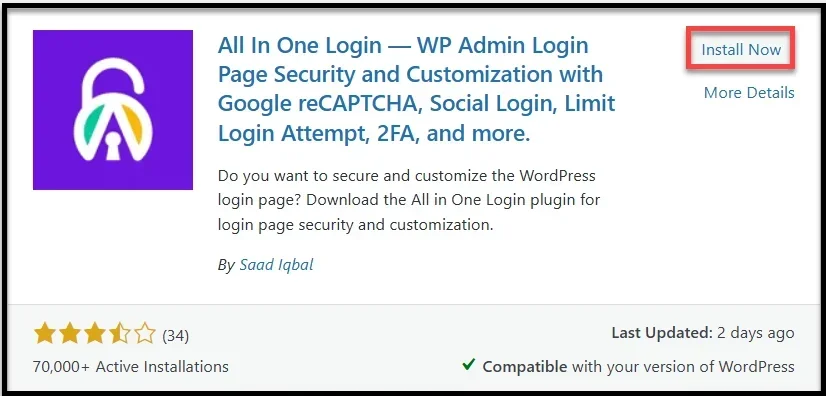
- Install and activate the All In One Login plugin by Saad Iqbal.
Note: If you don’t know how to install a plugin, check out our installation documentation.
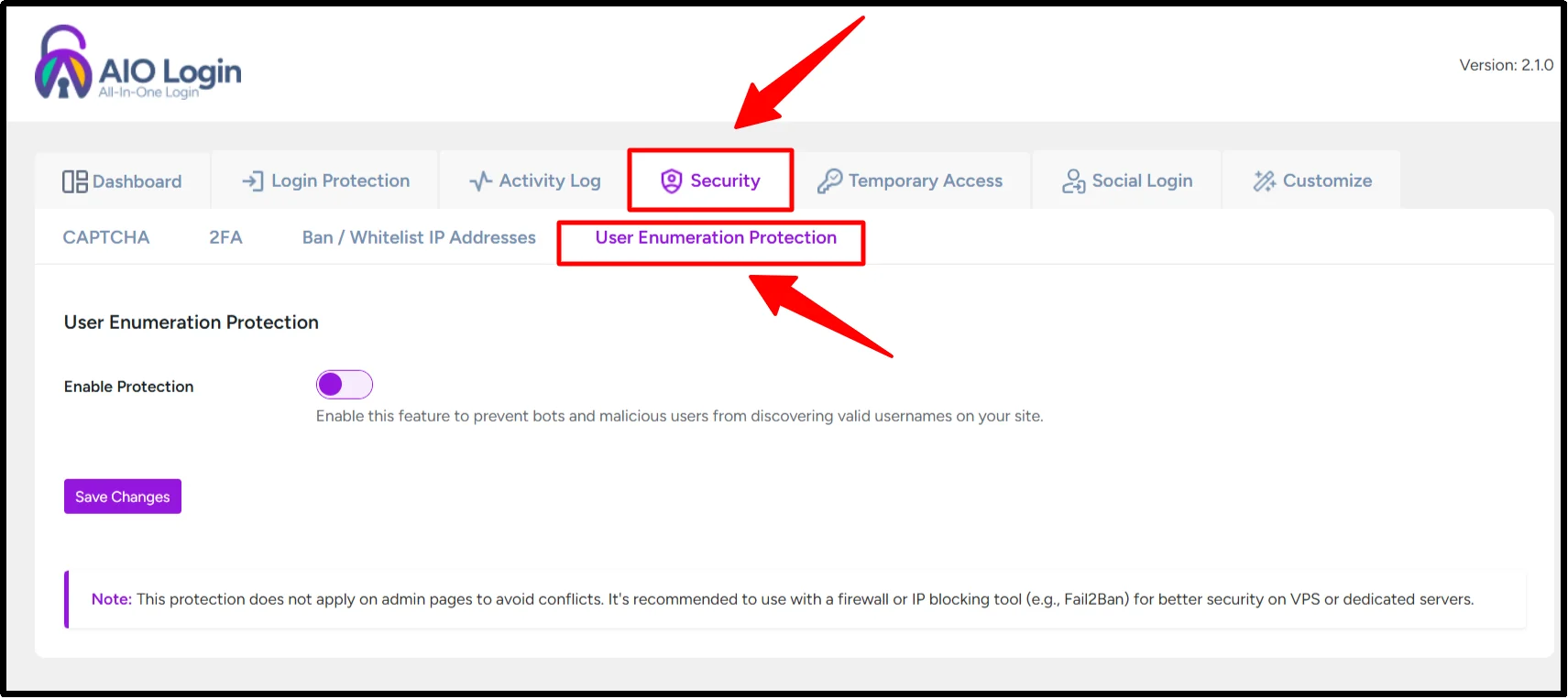
- Navigate to All In One Login → Security → User Enumeration.
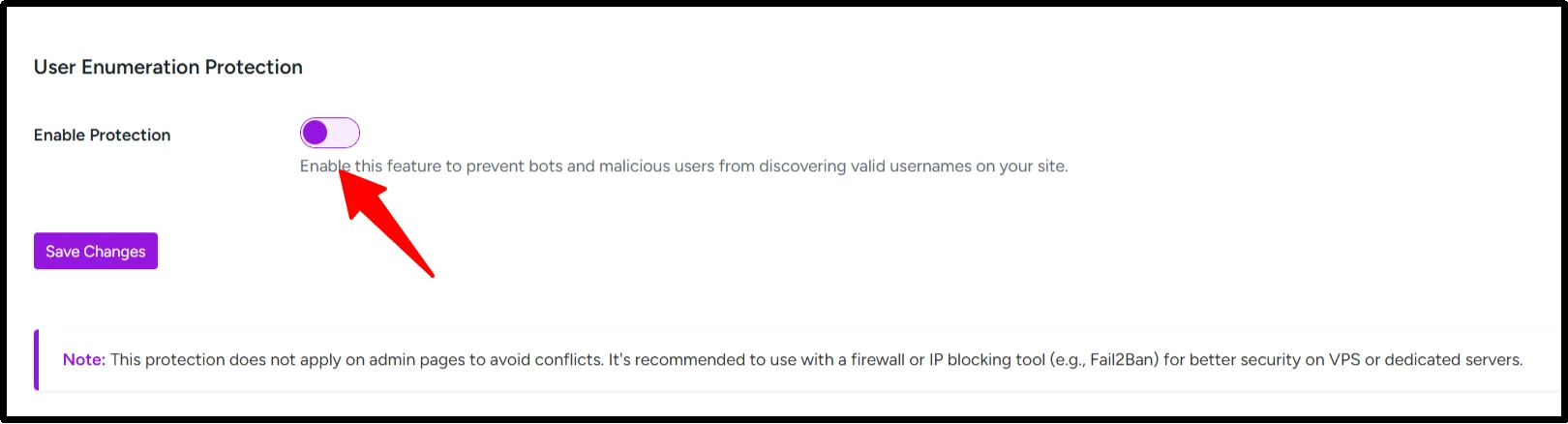
- Toggle on “Enable Protection” to activate the feature.
- Optionally, enable additional enumeration prevention options for stronger security.
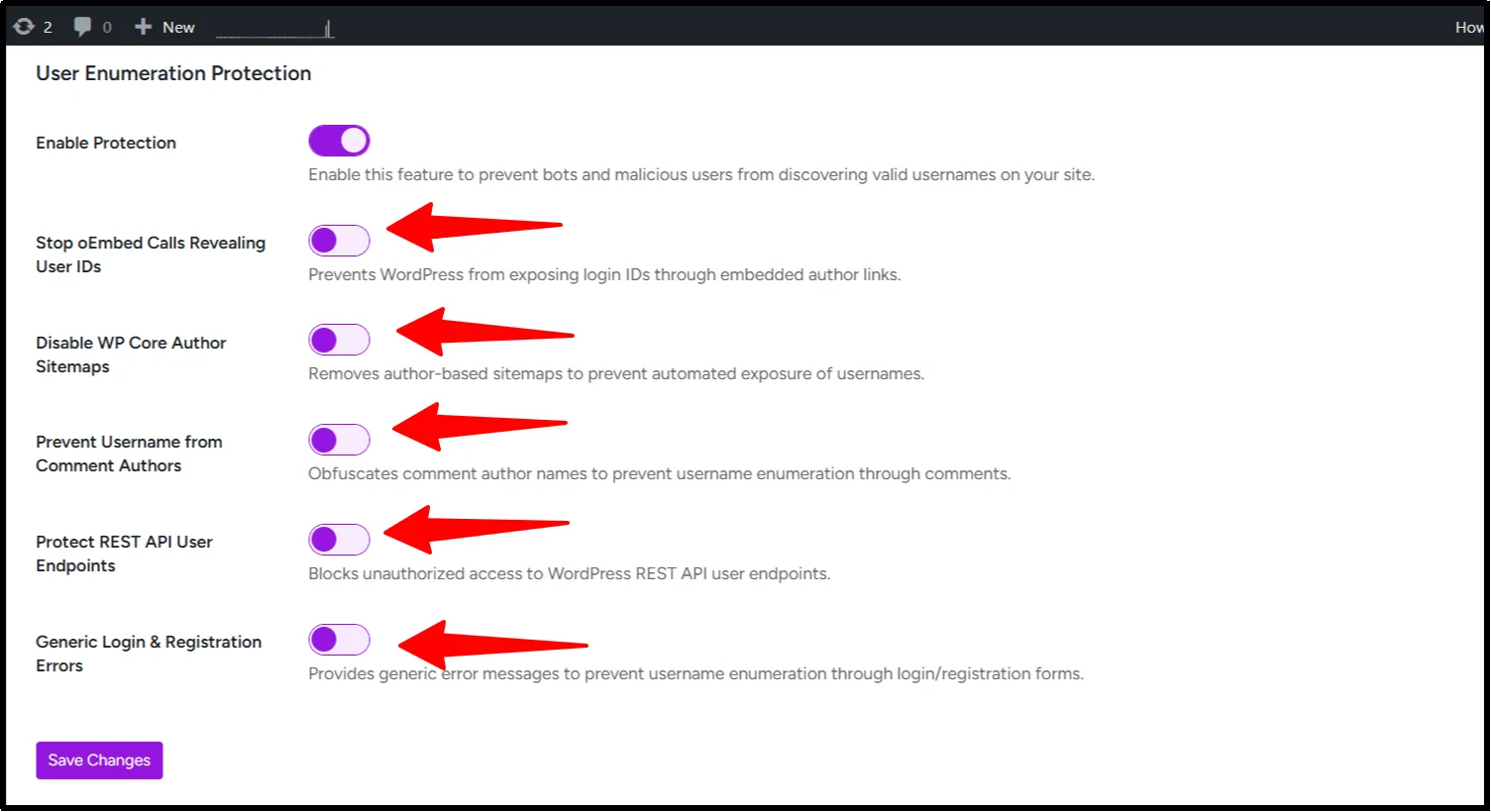
- Click Save Changes to apply your settings.
Available Settings to Customize Protection
- Stop oEmbed Calls Revealing User IDs – prevents usernames from being exposed when your content is embedded on external sites.
- Disable WP Core Author Sitemaps – removes author sitemaps to prevent bots from collecting usernames, ideal for multi-author sites.
- Prevent Username from Comment Authors – hides usernames in public comment metadata, protecting users who may use login names as display names.
- Protect REST API User Endpoints – ensures user data is only accessible to authenticated requests.
- Generic Login and Registration Errors – displays generic messages to prevent attackers from confirming valid usernames.
Other Plugin Alternatives
- Wordfence – offers firewall and login security, including user enumeration protection.
- Solid Security – blocks enumeration attempts and strengthens login forms.
- Hide My WP Ghost – hides common WordPress paths to prevent username discovery.
Among these, All In One Login is particularly beginner-friendly and comprehensive, making it an ideal choice for quickly securing usernames.
2. Hide or Disable Author Archive Pages
Author archive pages are one of the most common ways usernames are exposed in WordPress. By hiding or disabling these pages, you can prevent attackers from discovering valid usernames through URLs like /author/admin/.
Using SEO Plugins (RankMath / Yoast)
Most popular SEO plugins provide a simple way to disable author archives without touching any code. You can:
- Disable author archives completely
- Redirect them to the homepage or blog page
This ensures that URLs like /author/username/ no longer reveal login information.
Disable Author Archives with a Code Snippet
For a code-based solution, you can add a snippet to your theme’s functions.php file or use the Code Snippets plugin. This snippet automatically redirects any author archive page to your homepage, ensuring usernames are never exposed.
Pro tip: This method is especially useful for multi-author sites where multiple usernames could be at risk.
3. Protect or Restrict the WordPress REST API
The WordPress REST API can expose usernames if left unrestricted. Protect it by limiting access to authenticated or authorized users. You can add a code snippet to your functions.php file or use the Code Snippets plugin to block public access to user endpoints.
WordPress login security plugins like All In One Login also offer WordPress REST API security, letting you restrict unauthorized access without any coding. They hide WordPress usernames and reduce the risk of automated attacks.
4. Prevent Username Exposure via Login Error Messages
By default, WordPress shows distinct messages for login errors, such as ‘Invalid username’ or ‘Incorrect password.’ This allows attackers to identify valid usernames, which they can then target with brute-force attacks or stolen passwords.
To stop this, configure generic error messages (e.g., ‘Invalid credentials’) so attackers can’t distinguish whether the username or password was wrong. This small change makes it much harder for attackers to identify valid usernames and strengthens your overall WordPress login security.
If you want, you can implement this using a plugin like All In One Login, which automatically handles generic error messages and protects against brute-force attacks without requiring any coding.
5. Protect Admin Usernames: Best Practices
Admin usernames are prime targets for attackers. To secure your site:
- Avoid using “admin” as a username.
- Choose complex, unique usernames that are hard to guess.
- Do not expose admin accounts as content authors on public pages.
- Create separate editor-level accounts for regular content posting to reduce risk.
These best practices make it significantly harder for attackers to find and target administrator accounts.
6. Enable Two-Factor Authentication (2FA) and Additional Login Protections
Two-factor authentication (2FA) adds an extra layer of security to your login process. Even if usernames are discovered, 2FA prevents unauthorized access by requiring a second verification step. All In One Login seamlessly integrates 2FA and provides comprehensive login protection, making it the easiest choice for WordPress users.
7. Enforce Rate Limiting and Firewall Protection
Limiting repeated login attempts and throttling suspicious activity helps block automated attacks.
- Block repeated login attempts using All In One Login to prevent brute-force attacks.
- Throttle suspicious requests to slow down bots.
- Use firewalls such as Cloudflare, Wordfence, or Sucuri for additional protection.
These measures reduce the chance of attackers discovering usernames or compromising your site.
8. Use a Custom or Hidden Login URL
Changing your login page URL prevents attackers from targeting the default /wp-login.php page. All In One Login allows you to easily set a custom login slug, hide the default login URL, and block direct access. This simple change makes it harder for bots to enumerate usernames and brute-force your login page.
Conclusion
WordPress user enumeration may seem like a small vulnerability, but in the wrong hands, it becomes a gateway for hackers to exploit your site. Every exposed username is a potential entry point for brute-force attacks, credential stuffing, and automated bots.
The reality is stark: millions of attacks target WordPress sites every year, and no website is immune. Proactive protection, through strong login security, 2FA, custom URLs, and tools like All In One Login, is no longer optional; it’s essential.
So, don’t wait! Get the All In One Login and improve your WordPress site security today to prevent catastrophic breaches tomorrow. Don’t wait for an attack to realize the value of strong WordPress security.
FAQs about WordPress User Enumeration
Is WordPress vulnerable to username enumeration?
Yes, by default, WordPress can be vulnerable to username enumeration through login attempts and password reset requests. Attackers can determine valid usernames by analyzing error messages and responses.
How do I hide WordPress usernames from public view?
1. Modify or hide author URLs using plugins.
2. Redirect Author Pages to prevent author pages from showing.
3. Use plugins or custom code to hide usernames in HTML source (meta tags, comments).
4. Edit theme files to remove author info or use a plugin to disable it.
What is WordPress author archive enumeration?
WordPress author archive enumeration refers to the process by which an attacker tries to discover valid usernames on a WordPress site by accessing author archive pages.
Does REST API expose WordPress usernames?
Yes, the WordPress REST API can expose usernames, especially through endpoints like /wp-json/wp/v2/users and author data in posts.