

Many WordPress site owners underestimate how exposed their login pages are until an attack occurs. With WordPress powering over 43% of all websites, its widespread use makes login pages a frequent target for automated attacks exploiting weak credentials and exposed access points.
The WordPress login page is often the first point attackers target. Without proper protections, weak credentials or unsecured access can compromise site integrity and lead to unauthorized dashboard access.
Securing your WordPress login protects your users, content, and site’s reputation. Following modern WordPress login security best practices helps prevent breaches, downtime, and costly recovery efforts.
Why Should You Secure the WordPress Login Page?
Many site owners assume WordPress is secure by default, but its login system lacks several protections needed to defend against modern, automated attacks. While the core platform is stable, the default login setup is a frequent target for exploitation.
Automated bots constantly scan WordPress sites for exposed login pages and weak credentials. Once identified, they launch large-scale brute force attacks by testing thousands of username and password combinations until access is gained.
Brute force attacks are among the most common and damaging login threats. They can slow down your site, strain server resources, and lead to unauthorized admin access if left unprotected.
Securing your WordPress login page helps protect user data, maintain site performance, and prevent security incidents that can damage your site’s credibility and require costly recovery efforts.
10 Essential Steps to Secure Your WordPress Login Page
Securing your login page requires a layered approach. No single setting can block all threats, which is why the most effective strategy is to apply multiple safeguards that work together. These steps focus specifically on reducing login-based risks and overall WordPress login page protection without overcomplicating site management.
1. Install a WordPress Security Plugin for Login Protection
The foundation of strong login defense starts with a reliable WordPress login security plugin. These plugins act as centralized login security tools that monitor, filter, and block suspicious login activity in real time.
A well-built WordPress security plugin usually includes a built-in WordPress firewall plugin that filters malicious traffic before it reaches your login page. This prevents bots from repeatedly accessing /wp-admin or login URLs. Many tools also offer WordPress malware scanning, which helps detect compromised files that could silently weaken login security.
When combined, these features form a complete WordPress security platform, giving you visibility into login attempts, automated IP blocking, and alerts for unusual behavior. This step alone significantly reduces the risk of unauthorized access and creates a strong baseline for all other login security measures.
2. Change and hide your WordPress login URL
By default, WordPress uses predictable login paths like /wp-admin and /wp-login.php. Bots and attackers scan the web specifically for these URLs, making them easy targets. This is why changing the WordPress login URL is considered a core step in WordPress login page protection.
To change the WordPress login page, you can use the All In One Login plugin. For a step-by-step guide, check out our detailed guide on changing the WordPress login URL.
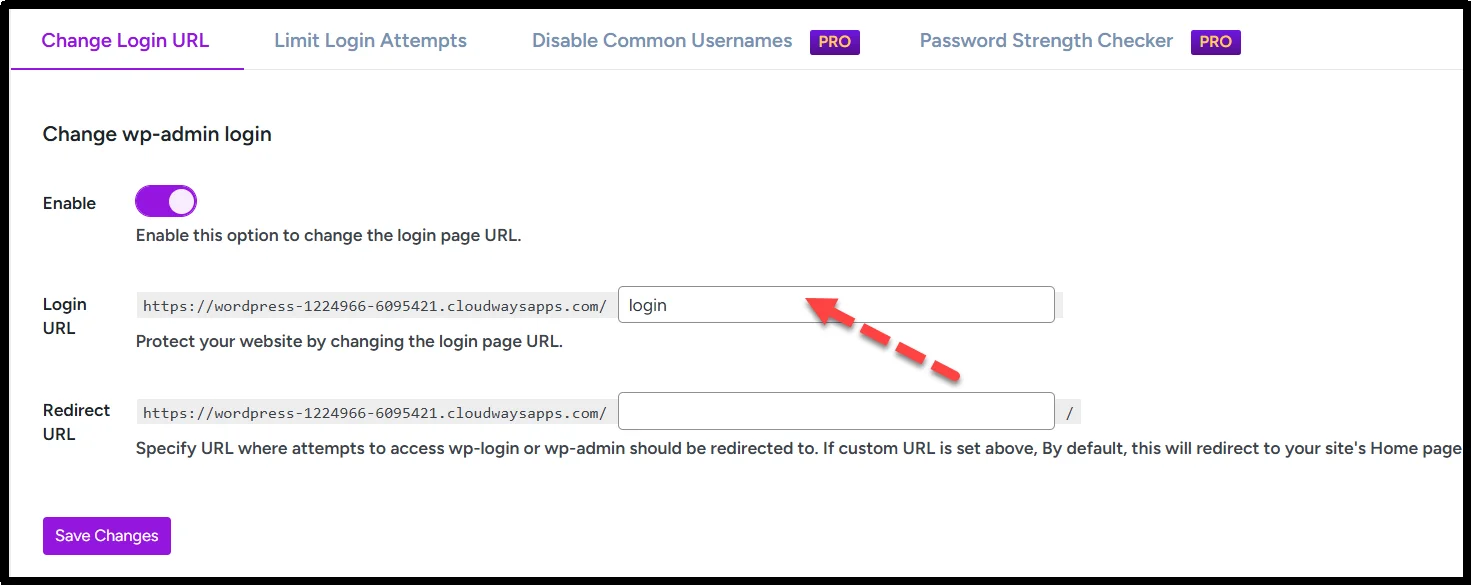
When you change and hide your WordPress login URL, you replace the default login path with a custom one that only you and trusted users know. While it doesn’t replace other security measures, changing the login URL significantly reduces automated attacks because most bots rely on default paths. If the login page can’t be easily discovered, most automated attacks stop before they begin, although targeted attacks can still reach the login endpoint.
3. Limit login attempts to stop brute force attacks
One of the most effective ways to defend against WordPress brute force attacks is to limit login attempts in WordPress. Brute-force attacks work by systematically trying thousands of username and password combinations until one combination works. Restricting login attempts blocks this automated trial-and-error process.
The All In One Login plugin also offers this feature:
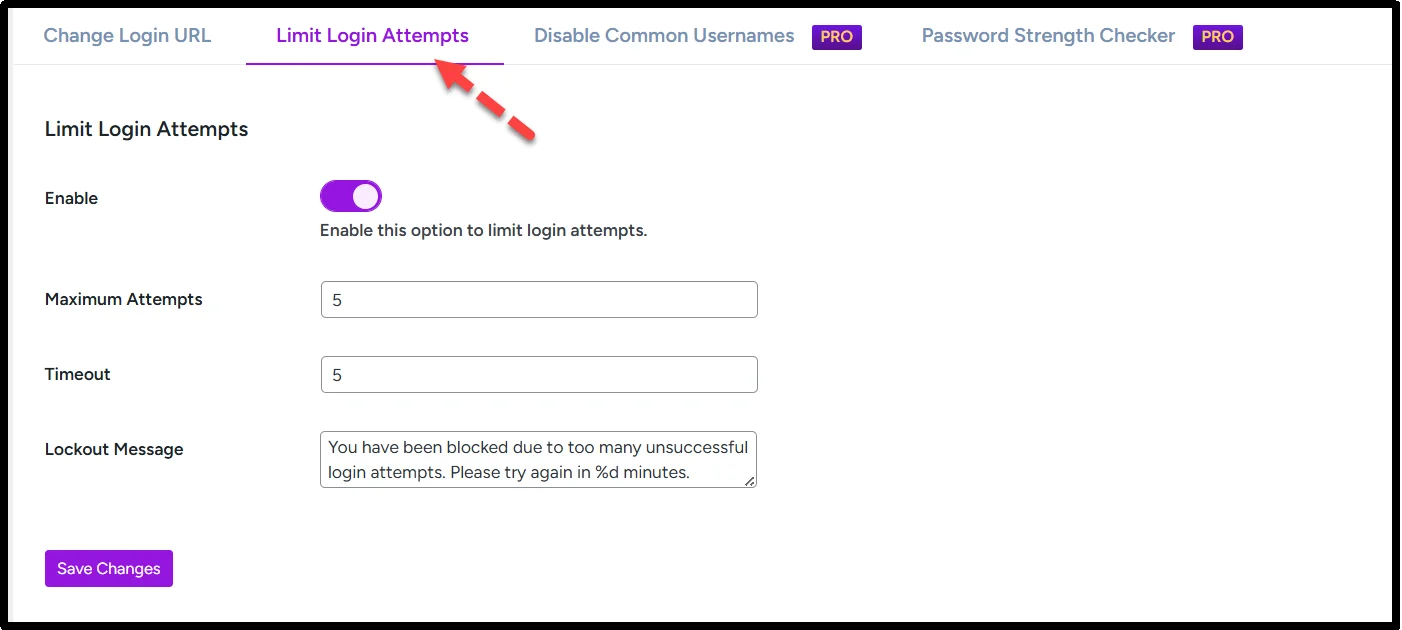
Most security plugins allow you to define the maximum number of failed login attempts before a user, IP address, or device fingerprint is temporarily blocked. You can also customize lockout durations and receive alerts for repeated failed attempts. This not only stops malicious bots but also prevents unnecessary strain on your server.
4. Enforce a strong password policy for all WordPress users
Weak passwords are one of the easiest ways attackers gain access. Implementing a strong password policy for WordPress ensures that every user, including administrators, uses complex, unique credentials that are difficult to guess or crack.
A strong WordPress password policy should include:
- Uppercase and lowercase characters
- Numbers and special symbols
- A minimum length of 12 characters
- Periodic password updates
You can implement this policy using the All In One Login as well:
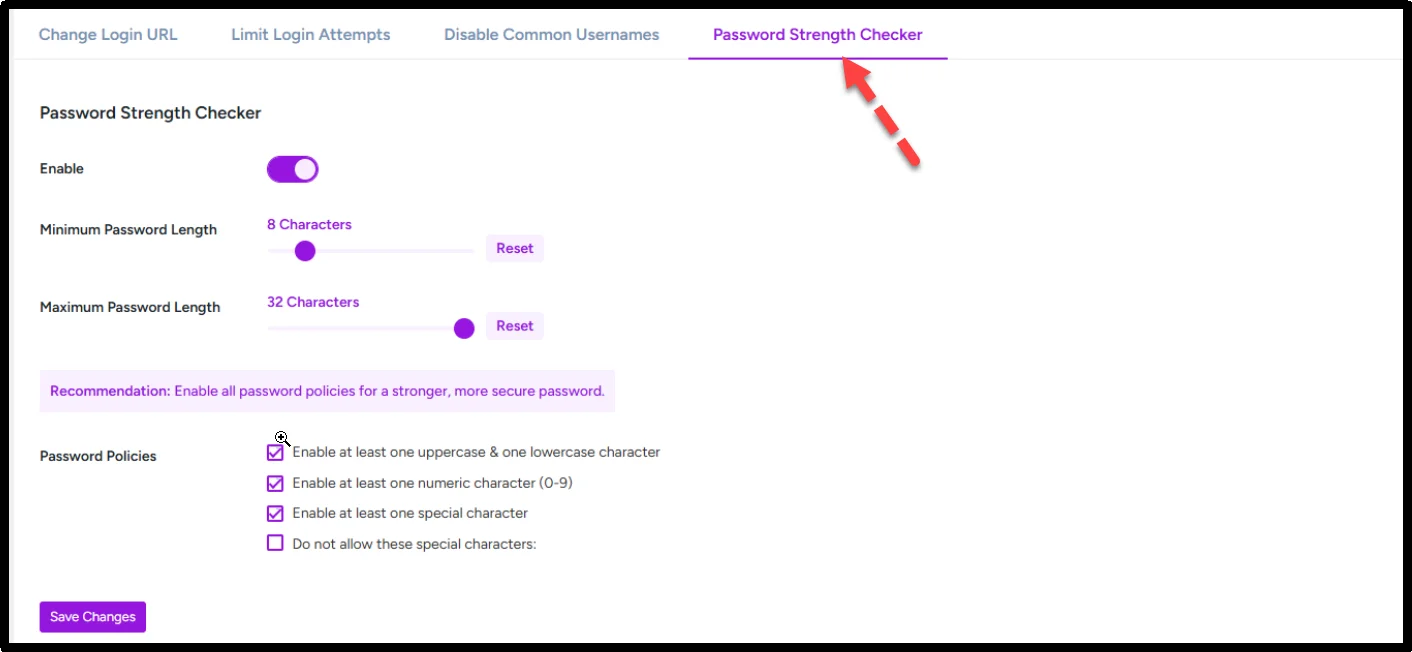
By enforcing this policy, you significantly improve WordPress login security and protect your site from common login-based attacks. It also reduces the risk of WordPress login page hacks caused by stolen or guessed passwords.
5. Add two-factor authentication (2FA) to your WordPress login
Adding two-factor authentication for WordPress login provides an extra layer of security beyond passwords. Even if a hacker obtains a user’s credentials, they cannot access the account without the second authentication factor, which could be a code sent to a mobile device or an authentication app.
With the All In One Login, you can add 2FA to your WordPress Login page:
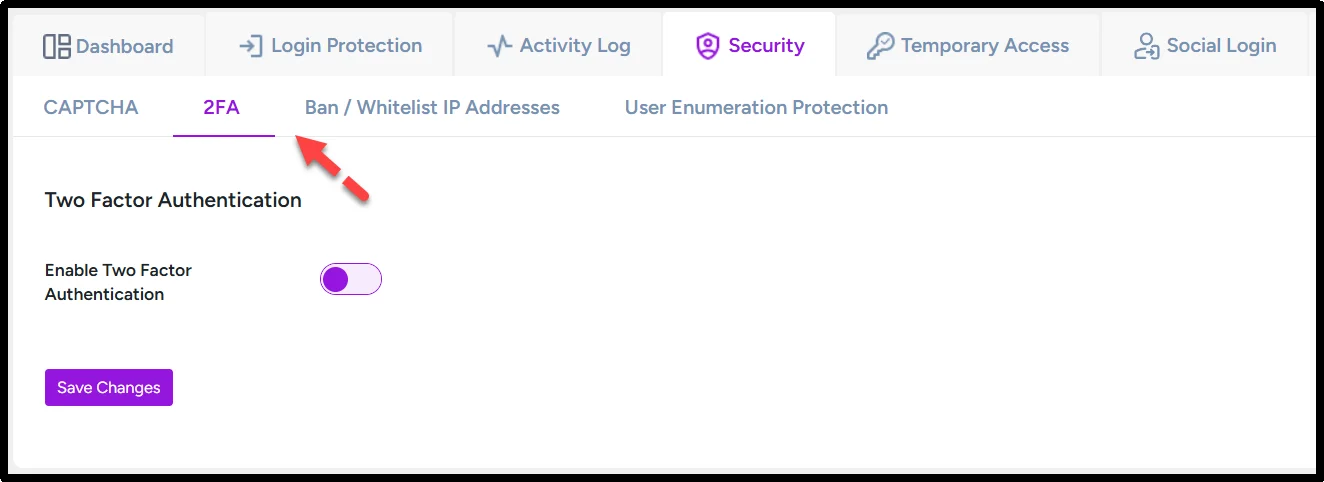
This step ensures that your secure WordPress login remains protected against credential theft and significantly strengthens WordPress login page protection.
Two-factor authentication is one of the most recommended WordPress login security best practices, especially for administrators and users with elevated permissions.
6. Password protect and secure your wp-admin directory
Protecting your wp-admin directory adds a server-level security layer before anyone can even access WordPress login pages. You can password-protect the wp-admin directory using server-level authentication methods such as .htaccess or hosting control panels, though care should be taken to avoid blocking admin-ajax.php and REST API requests.
For advanced protection, you can also secure the wp-admin with .htaccess, allowing access only from specific IP addresses. This ensures that even if someone discovers your login URL, they cannot reach the dashboard without the extra authentication.
This step is effective for both WordPress login page protection and for sites that want to secure WordPress login without plugin solutions. It’s particularly useful for high-value websites or those that handle sensitive data.
7. Disable WordPress login hints and hide usernames
WordPress by default reveals whether a username or password is incorrect during login errors. These error messages can be exploited to confirm valid usernames and refine brute force attacks. To prevent this, you should disable WordPress login hints using security plugins or custom filters.
Additionally, it’s important to hide the WordPress username on login forms. If usernames are exposed, attackers can pair them with common passwords or previously leaked credentials, increasing the risk of unauthorized access.
Implementing these changes strengthens WordPress login security, making it harder for attackers to target your users and admin accounts effectively.
8. Enable auto logout for inactive WordPress users
Idle sessions can be a serious security risk, especially on shared or public devices. Enabling auto logout WordPress users ensures that active login sessions are invalidated after a period of inactivity.
This feature is particularly important for websites with multiple contributors, as it enforces WordPress user roles and permissions security. By automatically ending inactive sessions, you prevent potential misuse of logged-in accounts and strengthen your overall WordPress login security.
Configuring auto logout is easy with most WordPress security plugins and works alongside other measures like strong passwords and two-factor authentication to provide comprehensive login protection.
9. Install SSL and force HTTPS on your WordPress login page
Encrypting data between your users’ browsers and your server is critical for WordPress wp-admin security. Installing an SSL certificate on your site ensures that login credentials are transmitted securely. To enforce this, you should install an SSL certificate on WordPress and configure your site to use HTTPS for WordPress login page access.
HTTPS prevents attackers from intercepting login credentials during transmission, safeguarding both administrators and users. Combined with other measures like strong passwords and two-factor authentication, SSL ensures that your secure WordPress login is protected against eavesdropping and man-in-the-middle attacks.
10. Secure XML-RPC and reduce attack surface
XML-RPC is a WordPress feature that enables remote publishing and app connections, but it is frequently abused in large-scale brute force and DDoS attacks. If your website does not require remote publishing or app connections, it is safest to disable XML-RPC in WordPress if your site does not rely on mobile apps, Jetpack, or remote publishing features.
For sites that need XML-RPC, you can implement XML-RPC security in WordPress by limiting access to specific IP addresses, using security plugins to monitor requests, or applying rate limits to prevent abuse. Securing XML-RPC reduces the number of potential entry points and strengthens overall WordPress login page protection, making it harder for hackers to compromise your admin accounts.
Secure Your WordPress Login Page with All In One Login
Managing multiple security layers can be overwhelming, especially for site owners who want a simple, centralized solution. The All In One Login plugin provides a comprehensive approach to WordPress login security by combining several key features in one tool.
With this plugin, you can:
- Limit login attempts in WordPress to prevent brute force attacks
- Change and hide WordPress login URL for better protection
- Enable two-factor authentication for WordPress login
- Monitor and block suspicious login attempts
- Enforce strong password policy for WordPress users
- Add protection against user enumeration vulnerability
- And much more.
By integrating these protections into a single platform, the plugin acts as a complete WordPress security platform, reducing complexity while keeping your secure WordPress login practices up to date.
Conclusion
Protecting your WordPress login page is no longer optional. It’s essential for keeping your site, users, and data safe from hackers and brute force attacks. By following steps like enforcing a strong password policy for WordPress, limiting login attempts in WordPress, enabling two-factor authentication for WordPress login, and customizing your login URL, you can drastically improve WordPress login security.
For an all-in-one, hassle-free solution, get the All In One Login plugin today and secure your WordPress site with a streamlined, all-in-one setup. Take control of your WordPress login security today and reduce the risk of unauthorized access before it becomes a problem.
FAQs
How secure is the default WordPress login page?
Implementing measures like changing the login URL, limiting login attempts in WordPress, and enabling two-factor authentication for WordPress login can significantly improve security.
What is the best way to secure a WordPress login page?
The most effective way to secure a WordPress login page is to use a layered security approach that combines multiple defenses:
1. Strong passwords
2. Two-factor authentication
3. Custom login URL to change and hide the WordPress login URL
4. Limit login attempts
5. HTTPS for WordPress login page
Can I secure my WordPress login without a plugin?
Yes, it’s possible to secure WordPress login without plugin solutions. You can:
1. Password protect wp-admin
2. Restrict access via .htaccess
3. Disable unnecessary features like XML-RPC
How do I protect WordPress from brute force login attacks?
To prevent brute force attacks on WordPress login, implement:
1. Limit login attempts in WordPress
2. IP blocking for repeated failures
3. Two-factor authentication for WordPress login
4. Strong passwords and updated security plugins
Do I really need 2FA for my WordPress login?
Two-factor authentication for WordPress login is one of the most effective methods to secure your site. Even if passwords are compromised, 2FA ensures attackers cannot gain access. Using the All In One Login plugin, you can set up 2FA on your WordPress login page.