



Two critical security vulnerabilities in PHP have prompted an urgent warning for WordPress website owners. Tracked as CVE-2026-109618 and CVE-2026-109619, these flaws could let attackers execute malicious code on vulnerable servers without logging in.
The PHP development team released security fixes on October 21, 2026. Both vulnerabilities have a CVSS v4.0 severity score of 9.2 out of 10.
If you run a WordPress website, now is the time to check your PHP version and confirm that your hosting environment has received the necessary security updates.
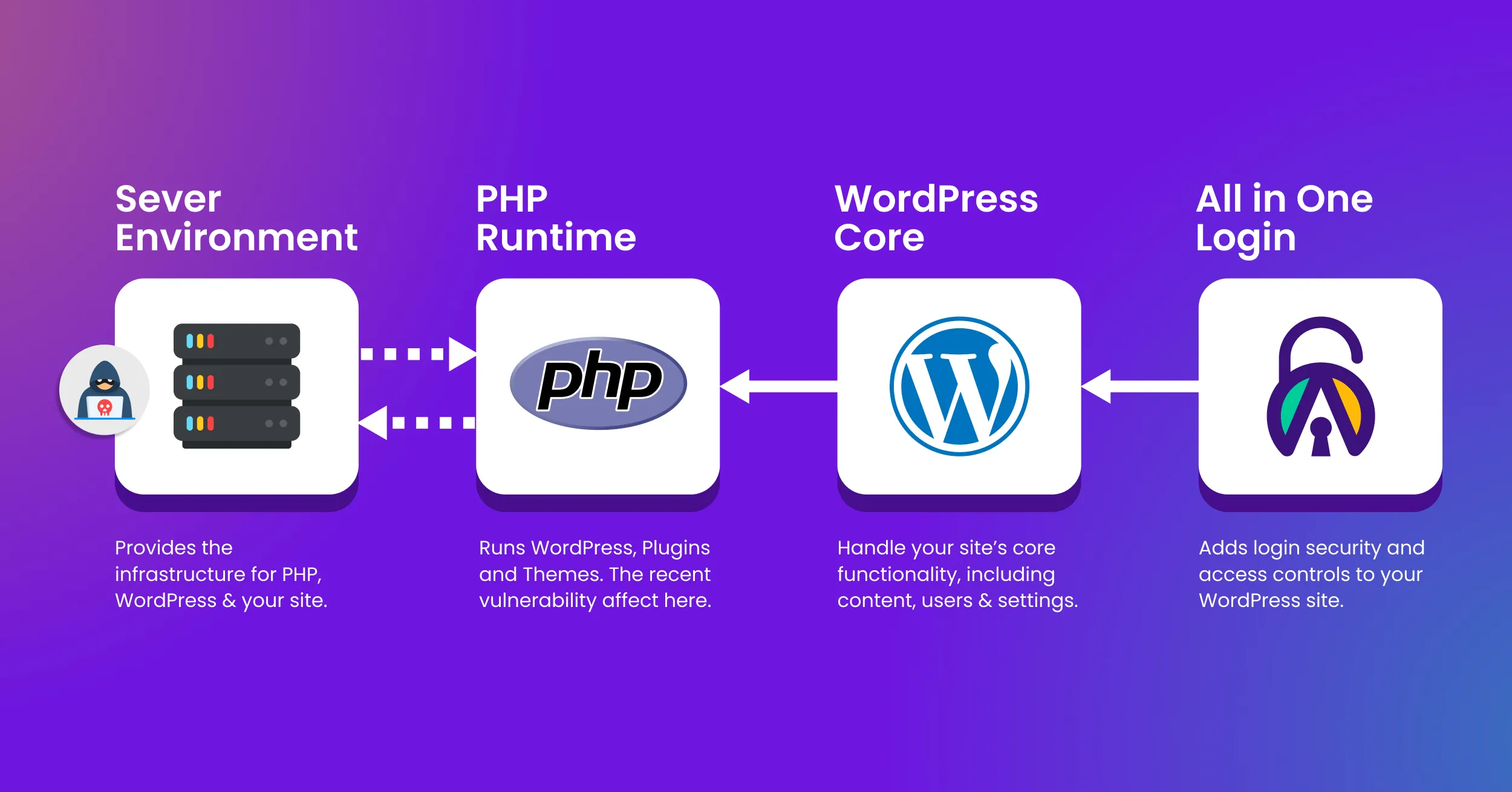
Important: These vulnerabilities affect the PHP runtime, not WordPress or All In One Login. Updating the plugin or WordPress will not fix them. Update PHP at the server level or contact your hosting provider to apply the security patches. Upgrade to a supported, patched PHP version, such as PHP 8.2.35 or later. If you cannot apply the fixes immediately, restrict public access to your website until the vulnerabilities are mitigated. Strong login security cannot replace server-level patching.
What Are the PHP2Shell Vulnerabilities?
PHP2Shell refers to two critical vulnerabilities in the PHP runtime, the server-side technology that powers WordPress and many other websites.
These are not flaws in WordPress core or a specific plugin. They affect PHP itself, which means a website can remain vulnerable even when WordPress, its plugins, and its themes are fully updated.
Here is a closer look at each vulnerability.
CVE-2026-109618: Memory Corruption During Out-of-Memory Handling
PHP uses a memory limit to control how much memory a request can consume. When a request exceeds that limit, PHP can interrupt its execution.
This vulnerability involves a flaw in how PHP handles that situation. Under certain conditions, internal request data may not be fully initialized before PHP starts cleaning it up. The resulting memory corruption can create an opportunity for remote code execution.
CVE-2026-109619: Stale Internal Request Data
PHP also manages internal data throughout a request’s lifecycle. This vulnerability can leave some request-specific state available after the memory behind it has been released.
A later request handled by the same PHP worker may then access that stale data. Under certain conditions, an attacker could exploit the resulting memory corruption to execute code on the server.
Both vulnerabilities require immediate attention. Their impact depends on the server environment, but website owners should not assume that an unpatched installation is safe.
Which PHP Versions Are Affected?
The PHP team released fixes for four supported branches on October 21, 2026.
| PHP branch | Security-fixed version |
| PHP 8.5 | 8.5.12 |
| PHP 8.4 | 8.4.27 |
| PHP 8.3 | 8.3.36 |
| PHP 8.2 | 8.2.35 |
If your server runs an earlier release, check whether your hosting provider has installed a security-fixed package.
Some Linux distributions and hosting vendors backport security fixes without changing the main PHP version number. Therefore, an older-looking version number does not always mean that a vendor-managed package remains vulnerable. Ask your provider to confirm that both CVEs have been addressed.
PHP 8.1 and older branches no longer receive regular security releases from the PHP team. Some vendors may provide backported patches, but you should confirm this directly or upgrade to a supported branch.
How to Protect Your WordPress Login and Website
Your login page is an important security boundary, but it is not the only part of your website that needs protection.
These vulnerabilities affect PHP at the server level. Depending on the environment, exploitation may begin before WordPress loads or before a login request reaches your authentication plugin.
Follow these steps to reduce your risk.
1. Check Your Website’s PHP Version
You can find the PHP version used by your WordPress website without accessing the server directly.
- Log in to your WordPress dashboard.
- Navigate to Tools → Site Health.
- Open the Info tab.
- Expand the Server section.
- Find the PHP version listed there.
This is a useful first check. However, the version displayed in WordPress may not tell the whole story if your hosting provider uses a vendor-patched package. Ask your provider to verify the security status of the PHP service that handles your website’s requests.
2. Install the Appropriate PHP Security Update
PHP updates happen at the server level. Updating WordPress core or installing the latest version of a plugin will not patch the PHP runtime.
If you use managed WordPress hosting, contact your hosting provider and ask them to confirm that both CVE-2026-109618 and CVE-2026-109619 have been fixed.
If you manage your own server, update the relevant PHP package and restart the PHP service so that existing workers use the patched code. If your website runs in containers, rebuild and redeploy the affected images.
Before making changes, take a recent backup and test the update on a staging site when practical. Then verify that the live website still works as expected.
3. Review Your Website for Signs of Compromise
Installing a patch protects against known vulnerabilities, but it does not remove an attacker who may have gained access before the update.
If your website remained exposed during the period before patching, review your security records and look for unusual activity, including:
- Administrator accounts you do not recognize.
- Unexpected changes to WordPress core files, plugins, or themes.
- Unknown PHP files or scripts in directories that should not contain them.
- Unusual outbound connections or unexpected server processes.
- Changes to authentication settings or other security controls.
Keep copies of relevant web server, PHP, firewall, and system logs. If you find suspicious activity, investigate it rather than assuming that a successful PHP update has resolved every problem.
4. Keep Your Login Security Controls in Place
Patching PHP should be your first priority. You should also continue using sound WordPress authentication practices.
Use strong, unique passwords for administrator accounts. Enable multi-factor authentication where available, limit unnecessary administrator access, and remove accounts that no longer need access.
A login security plugin such as All In One Login can help you manage your WordPress login security and related access controls. However, it cannot replace a PHP security patch or independently fix a vulnerability in the underlying runtime.
These protections work at different layers. Your server needs to be secure before you can rely on the application-level controls running on it.
Can a Security Plugin Block These PHP Vulnerabilities?
A WordPress security plugin can help defend against many attacks that target WordPress itself. Depending on its features, it may protect login forms, restrict access, or help detect suspicious activity.
But a vulnerability in PHP is different.
PHP processes requests at the server level. Some exploitation paths may run before WordPress core, a plugin, or a theme begins executing. As a result, application-level security controls cannot be relied on to block every attack path.
That is why updating PHP remains the primary fix. A firewall, strong authentication, regular backups, and careful access management provide additional layers of protection, but none should be treated as a substitute for patching the runtime.
What All In One Login Users Should Know
All In One Login helps website owners manage their WordPress login security. These PHP vulnerabilities do not mean that the plugin itself is affected, nor do they indicate that installing or updating the plugin will resolve the server-level issue.
There is no plugin-specific fix that replaces the PHP update.
If you use All In One Login, check your hosting environment first. Confirm that the PHP service has received the relevant security fixes, then review your login settings and other security controls as part of your normal security routine.
Final Thoughts
The PHP2Shell vulnerabilities are a reminder that WordPress security extends beyond the dashboard. Your plugins and themes may be fully updated, yet your website can still be exposed if the PHP runtime behind it remains vulnerable.
Check your PHP version today. Contact your hosting provider if you are unsure whether the fixes have been installed, and investigate any signs of compromise.
Update PHP first. Keep your login protections active. Review your website if it was exposed before patching.
For technical details, consult the official PHP security announcement and the CERT-EU advisory.