

The fact that 70% of weak passwords can be cracked with password-guessing attacks is scary. Combined with the fact that around 75% of people worldwide use weak passwords, it gets even more frightening.
If you are one of those 75% people who use a weak password for your WordPress, you can be at a serious security risk because the WordPress login URL is easy to reach. You can just append /wp-login.php/ to your domain, and there you go, the login page is right there in front of you. Combined with a weak password, you have just created a guide for hackers to enter whenever they want.
Therefore, you should hide the WordPress login page from hackers. This article explores two effective ways to do that. Without further ado, let’s jump right in!
Common WordPress Login Page Vulnerabilities
The WordPress login page is susceptible to password-guessing attacks, which are automated attempts by hackers to gain access. These cyberattackers use several techniques to improve their success rates, including:
Brute Force Attack
A brute force attack is a trial-and-error method used by hackers to crack passwords. It involves an automated script that tries every possible combination of letters, numbers, and symbols until it finds the correct one. While time-consuming, it’s considered the most comprehensive method for guessing a password.
Dictionary Attack
A dictionary attack is a type of password attack that uses a predefined list of words—a “dictionary”—to guess the correct password. Attackers often use common words, names, and phrases, as well as previously leaked passwords, to try to gain access. This method is faster than a brute force attack because it uses a smaller, more targeted set of guesses.
Leetspeak Attack
A leetspeak attack (also known as a leet or 1337 attack) is a type of brute force or dictionary attack that substitutes common letters with similar-looking numbers or symbols. For example, “E” becomes “3,” “A” becomes “4,” and “S” becomes “$.” This method works by taking common passwords and applying these substitutions.
Credential Stuffing
Credential stuffing is an attack where hackers use lists of compromised usernames and passwords from previous data breaches to gain unauthorised access to other accounts. This type of attack relies on the fact that many people reuse the same login information across multiple websites. If a hacker obtains your password from a breach on one site, they’ll likely attempt to use that same information to log into your WordPress account.
Hybrid Brute Force Attack
A hybrid brute force attack is a combination of a dictionary attack and a brute force attack. It begins with a known username and then uses a dictionary of common words. The script then adds numbers, special characters, or common patterns to these words to try to guess the password. For instance, if the dictionary word is “password,” the hybrid attack might try “password123,” “password!,” or “P@ssword.” This method is more sophisticated than a simple dictionary attack and significantly increases the chances of success.
2 Methods to Hide Your WordPress Login Page
Now that you understand the risks of not changing the login URL, let’s jump into the solutions.
Method #1. Manually Changing the Login URL
This method is for developers and experienced users only. It involves editing core WordPress files, a process that can break your site if not done correctly. We do not recommend this method for beginners or anyone without a solid understanding of coding and how WordPress works.
We strictly advise creating a complete backup of your site before attempting this.
The goal is to move the default /wp-login.php file and direct all login requests to a new, custom location. This is a powerful technique because it completely removes the standard login page from its predictable URL, making it almost impossible for hackers and automated bots to find it. Here’s how to do it:
- Create a Custom Login File: First, use an FTP client or a file manager plugin to access your website’s files. Navigate to the root folder where your wp-config.php file is located. Find the wp-login.php file, make a copy of it, and rename it to something unique and hard to guess, like my-secret-login.php.
- Edit the New Login File: Next, open your new file (my-secret-login.php) in a text editor. You’ll need to find and replace all instances of wp-login.php with your new file name. This is a critical step, as it ensures all internal links within the login file point to the correct place.
- Update the .htaccess File: Finally, you need to create a rewrite rule to redirect all traffic from the old login URL to your new one. Open your .htaccess file (it’s in the same directory) and add a rule that points requests for /wp-login.php to your renamed file. This ensures that any hacker trying the default URL will be met with a “404 Page Not Found” error.
Method #2. Using the All in One Login Plugin
For those who are not comfortable with coding, or for any beginner WordPress user, this is the recommended and much easier method.
Instead of manually editing core files, which can break your site, this method uses a plugin that handles the entire process for you with a few simple clicks. There is no need for coding or file editing.
The All in One Login plugin provides a simple and secure way to change your login URL and protect your site.
- Install and Activate the Plugin: From your WordPress dashboard, navigate to Plugins → click on Add Plugin → in the search bar, type “All in One Login” and find the plugin → click Install Now and then Activate.
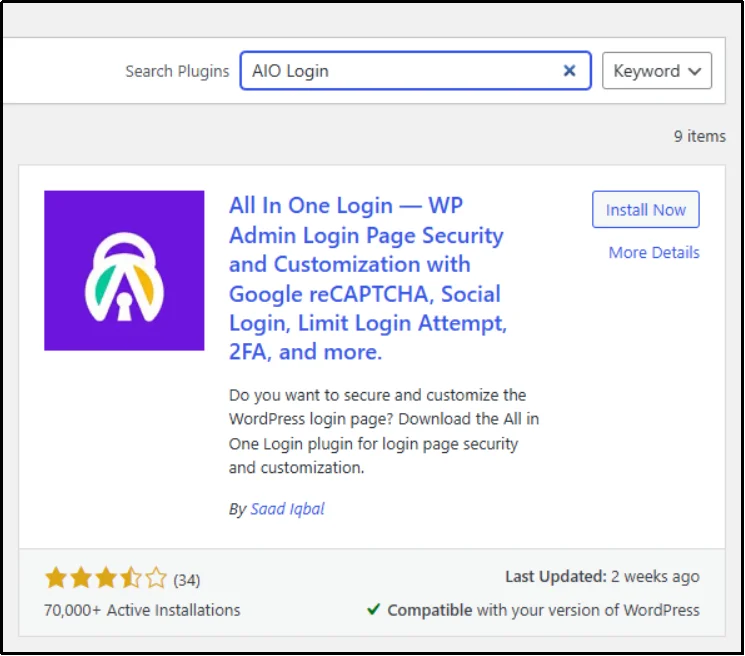
- Configure Your New Login URL: After activating the plugin, a new AIO Login option will appear in your WordPress side menu.
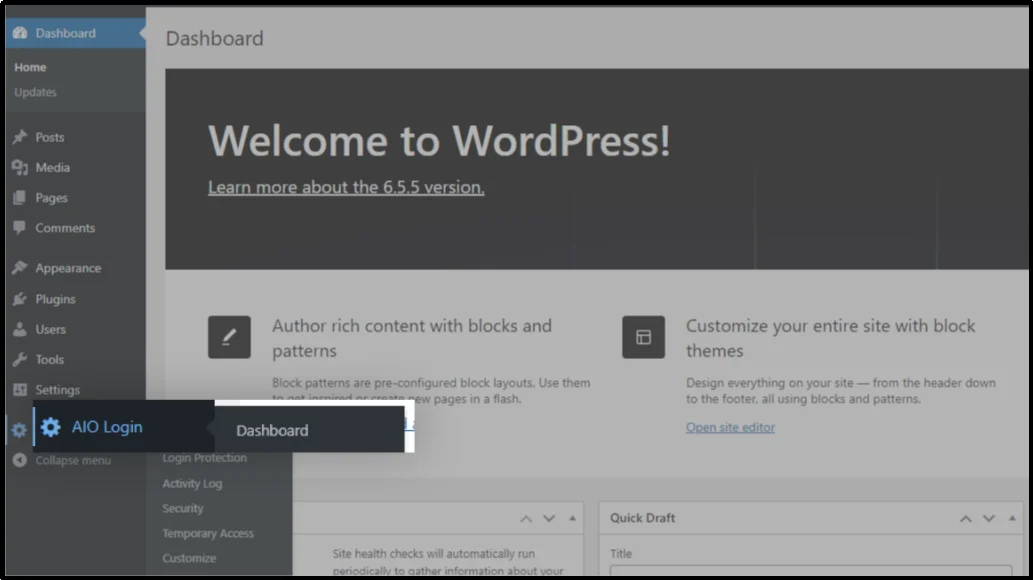
- Navigate to Login Protection: Click on it and go to the “Login Protection” tab.
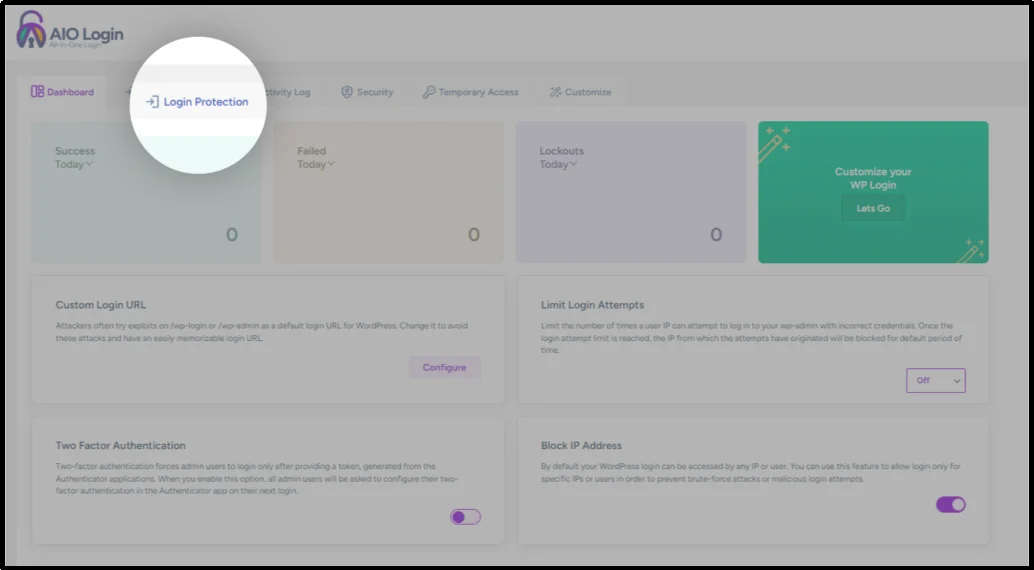
- Enable Custom Login URL: Here, you will find the option to Change WP-Admin Login URL. Enable this feature.
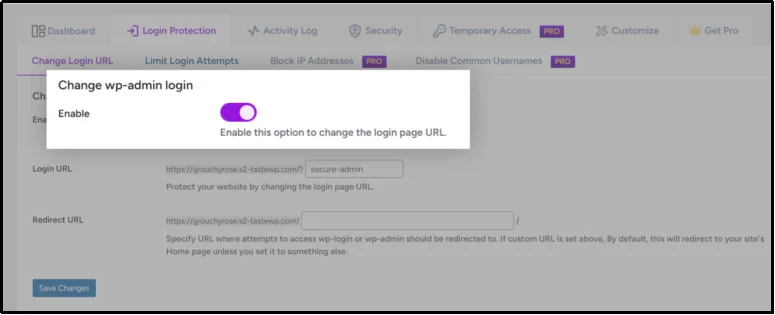
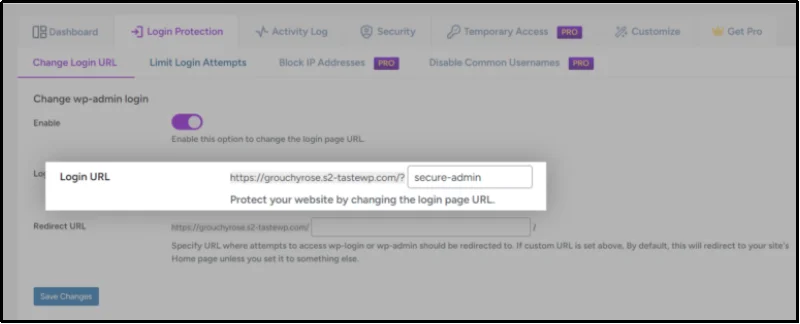
- Set a New URL: In the “Login URL” field, enter your desired custom login URL (e.g., my-secret-login). Remember to choose something unique and hard to guess.
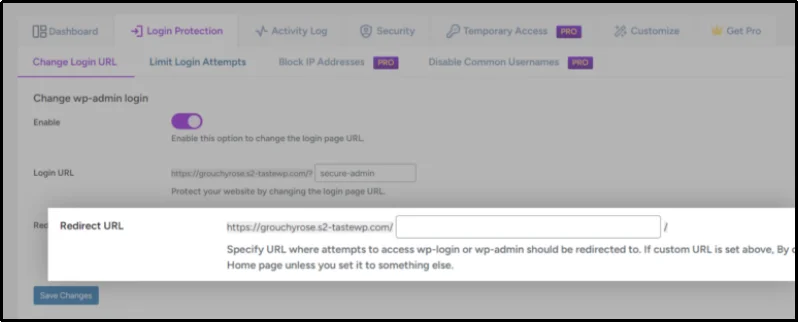
- Set Up Redirection Link: In the “Redirect URL” field, specify the URL where users will be sent if they try to access the old /wp-admin/ or /wp-login.php URLs. A good option is to redirect them to your homepage or a custom 404 page.
- Save Progress: Finally, click Save Changes.
The plugin will now handle the redirection, making it nearly impossible for automated bots and hackers to find your login page, significantly improving your site’s security.
Best Practices To Enhance Login Page Security Further
No matter which method you choose, you can always enhance security further using the following practices:
- Don’t use an easy-to-guess URL. Altering the URL from /wp-login.php to something simple like custom-login or new-login won’t provide much security. Therefore, it’s important to create a phrase that hackers would find difficult to guess.
- Enable Multi-factor authentication (2FA). Implementing two-factor authentication (2FA) or multi-factor authentication (MFA) is an effective way to enhance security and prevent unauthorized access. This method requires users to provide multiple forms of verification, typically involving a confirmation from the owner’s mobile device or email, which adds an additional layer of difficulty for potential hackers. Here’s how to add 2FA with All-in-One Login.
- Enable reCAPTCHA. Since hackers frequently use automated bots for brute force attacks, this approach helps to block bot logins. You can add reCAPTCHA with All-in-One Login as well.
- Use a firewall. Use a firewall to assess and regulate incoming traffic, and establish strict guidelines to prevent malicious actors and harmful traffic from entering.
Final Words
Your WordPress login page is the first line of defense against hackers, and leaving it exposed at its default URL only increases the risk of attacks.
By hiding or customizing your login page, whether manually or with the All in One Login plugin, you make it significantly harder for cybercriminals to gain unauthorized access.
Pair this with additional best practices like two-factor authentication, reCAPTCHA, and a firewall, and you create a layered security shield that keeps your site safe. Taking these preventive measures today will save you from costly breaches tomorrow. So, what are you waiting for? To customize and secure your WordPress login page, check out the All In One Login premium version today!